Support my channel by buying me a coffee: https://ko-fi.com/adinwalls%E2%81%A0
The RockNix Operating system is tried and trusted with a lot of devices on their list. It’s a well-supported group of developers and although they’ve come late to the Anbernic XX line of devices with the H700 chipset, I think this may be the easy install for people moving forward, although currently (Feb 2025) it’s still early days with a few issues that will be ironed out soon, I’m sure. Rocknix has a familiar Emulation Station frontend and is packed with useful features like over the air updates, artwork scraping, Portmaster and bluetooth controller support. It also allows you to do system wide changes in the system menu without needed to tweak RetroArch.
Installing Rocknix to an H700 device
So here’s a quick setup guide:
- What you’ll need:
- Internet connection
- computer (I’m running Windows)
- a copy of rufus (image burner)
- 2 micro SD cards (min 32gb + min 64gb)
- SD card reader
- Download the latest ROCKNIX release: Release 20250118 · ROCKNIX/distribution · GitHub (just choose the H700 release, or the one that has the name of your device in the list)
- Extract that file (if it doesn’t work natively, download something like 7zip)
- Open Rufus
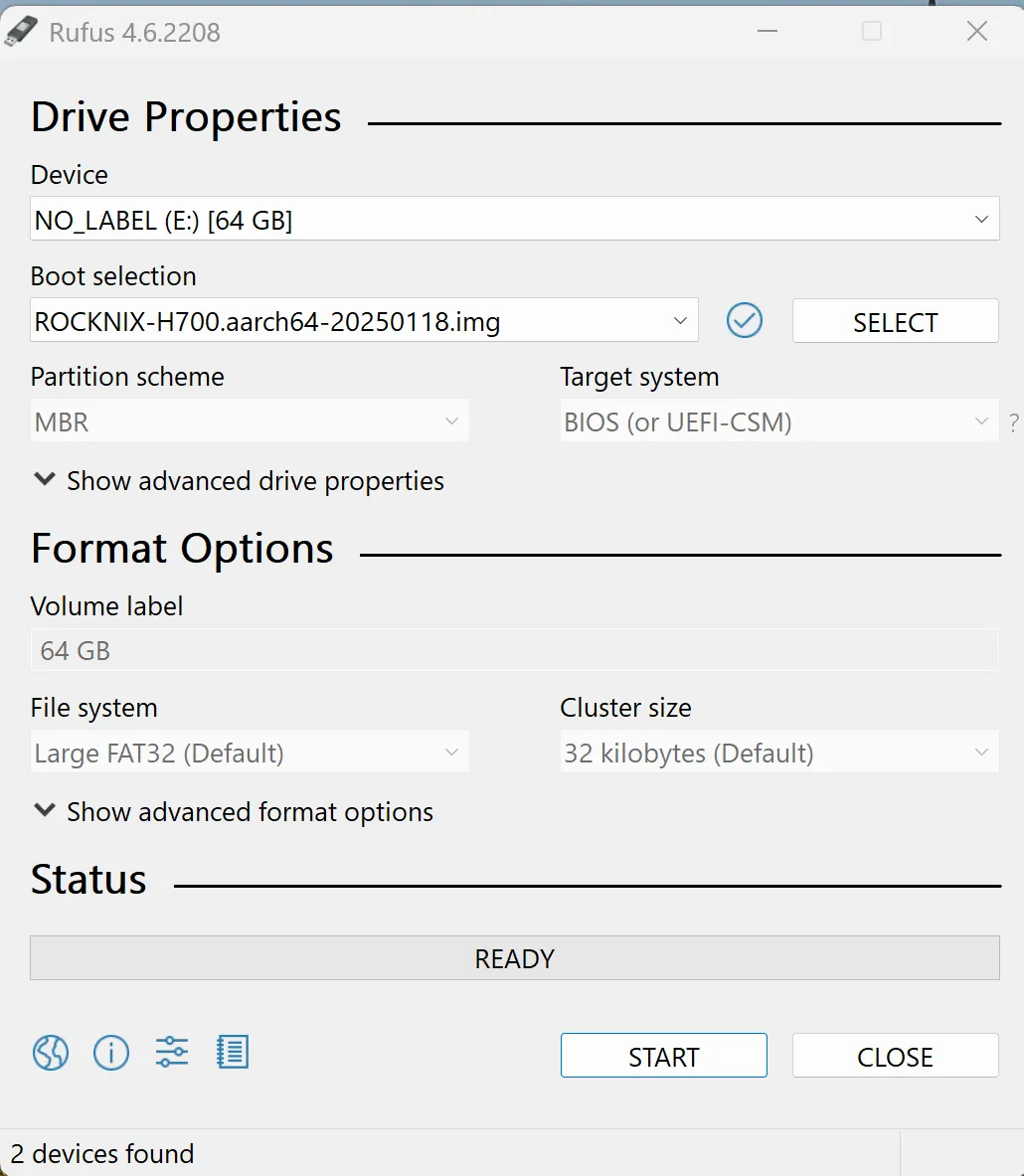
- Make sure you’ve selected the correct drive (eject any other SD cards or flash drives) e.g. I know I have selected the correct one because it’s the only 64gb drive connected to my computer
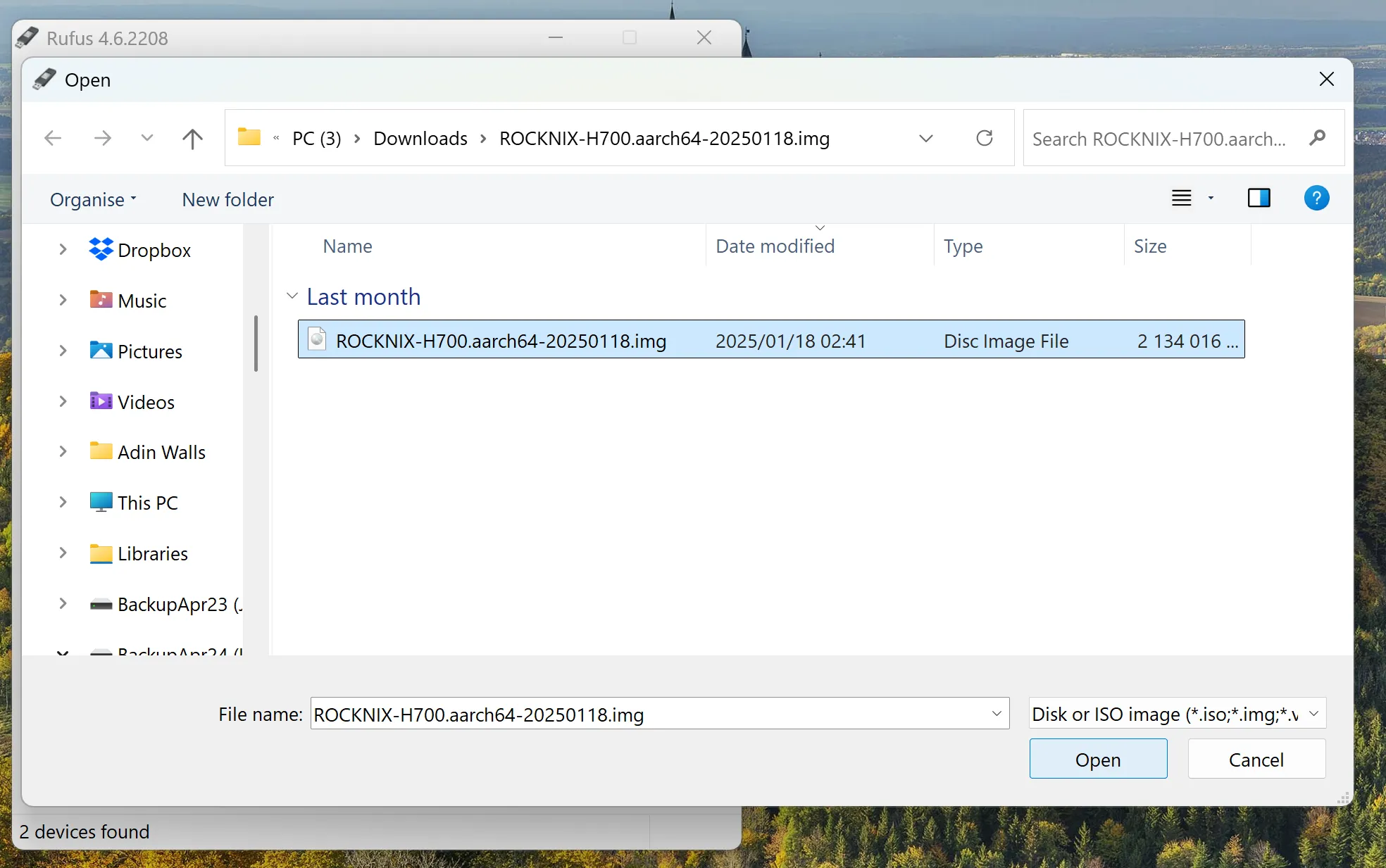
- Now click on SELECT and navigate to your Rocknix folder and open it and select the .iso file and select OPEN
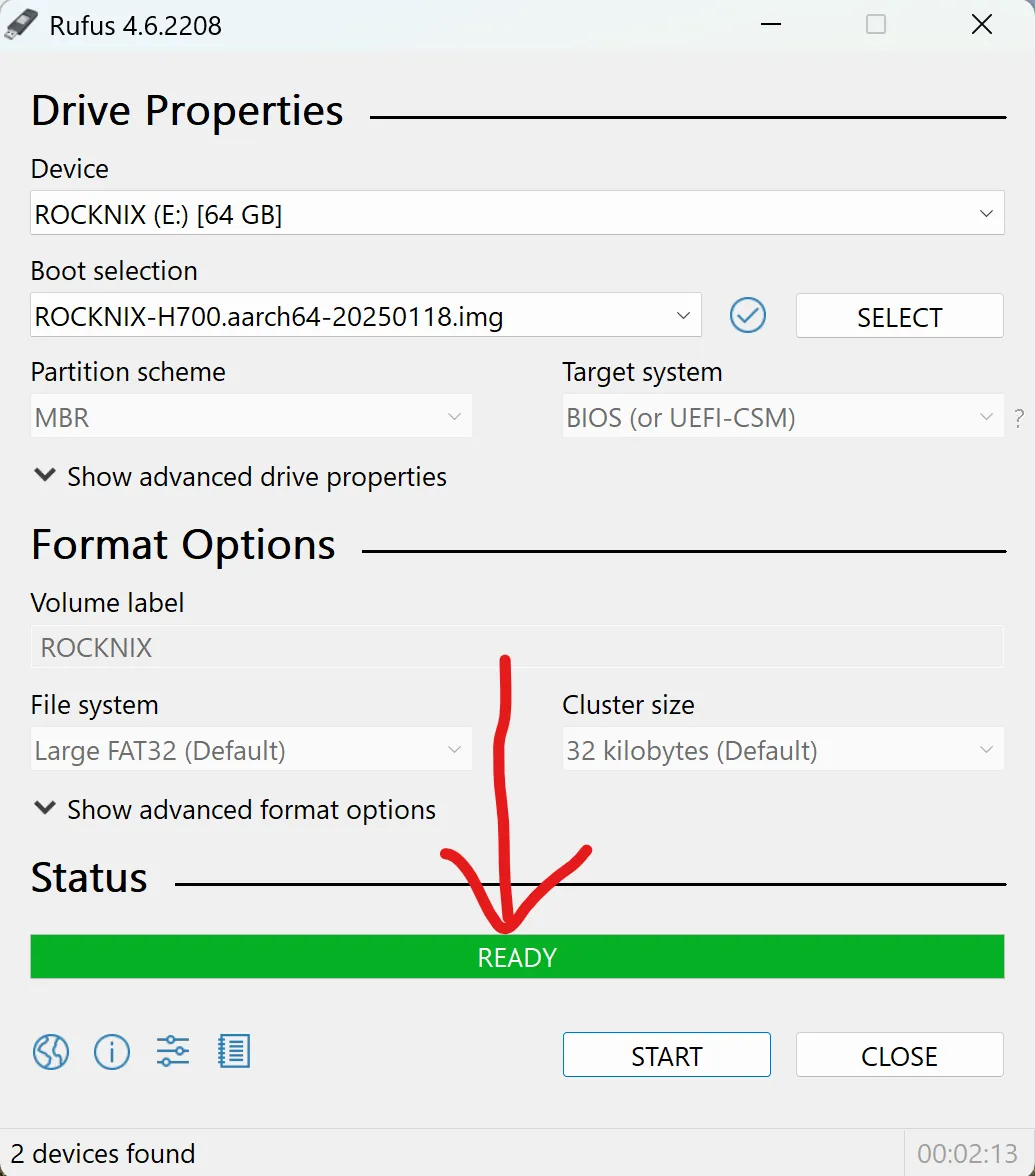
- Now select START within Rufus and say OK to the warning.
- Once Rufus says READY you can close the app
IMPORTANT FOR XX/H700 DEVICES (other devices skip to “Plug SD into device”:
- Once the .iso file is burnt to your SD card you need to do a manual setup for your specific H700 device - in our case the Cube XX
- A current list of devices and their corresponding files can be found here: Anbernic H700 installation guide - ROCKNIX Wik
- The file we are looking for is: sun50i-h700-anbernic-rgcubexx.dtb
- Your computer should suddenly detect a few “drives” or partitions.
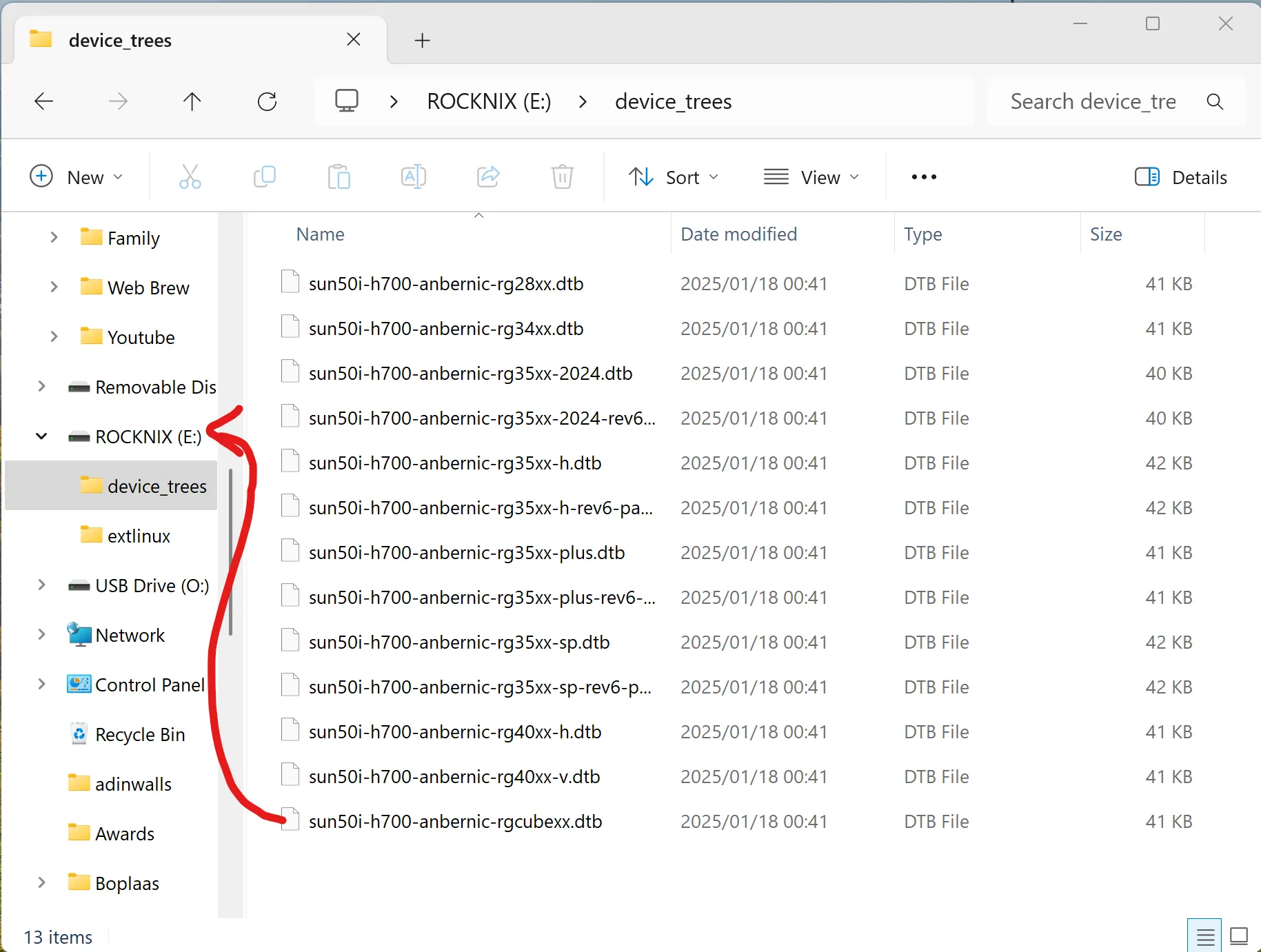
- Navigate to the ROCKNIX drive in your file browser and open the “device_trees” folder
- Locate the file named sun50i-h700-anbernic-rgcubexx.dtb or the file corresponding to your particular H700/XX device.
- Drag it to the root folder of the ROCKNIX drive
- Now rename the file that you just dragged to ROCKNIX to: dtb.img - make sure you select the file extention when renaming
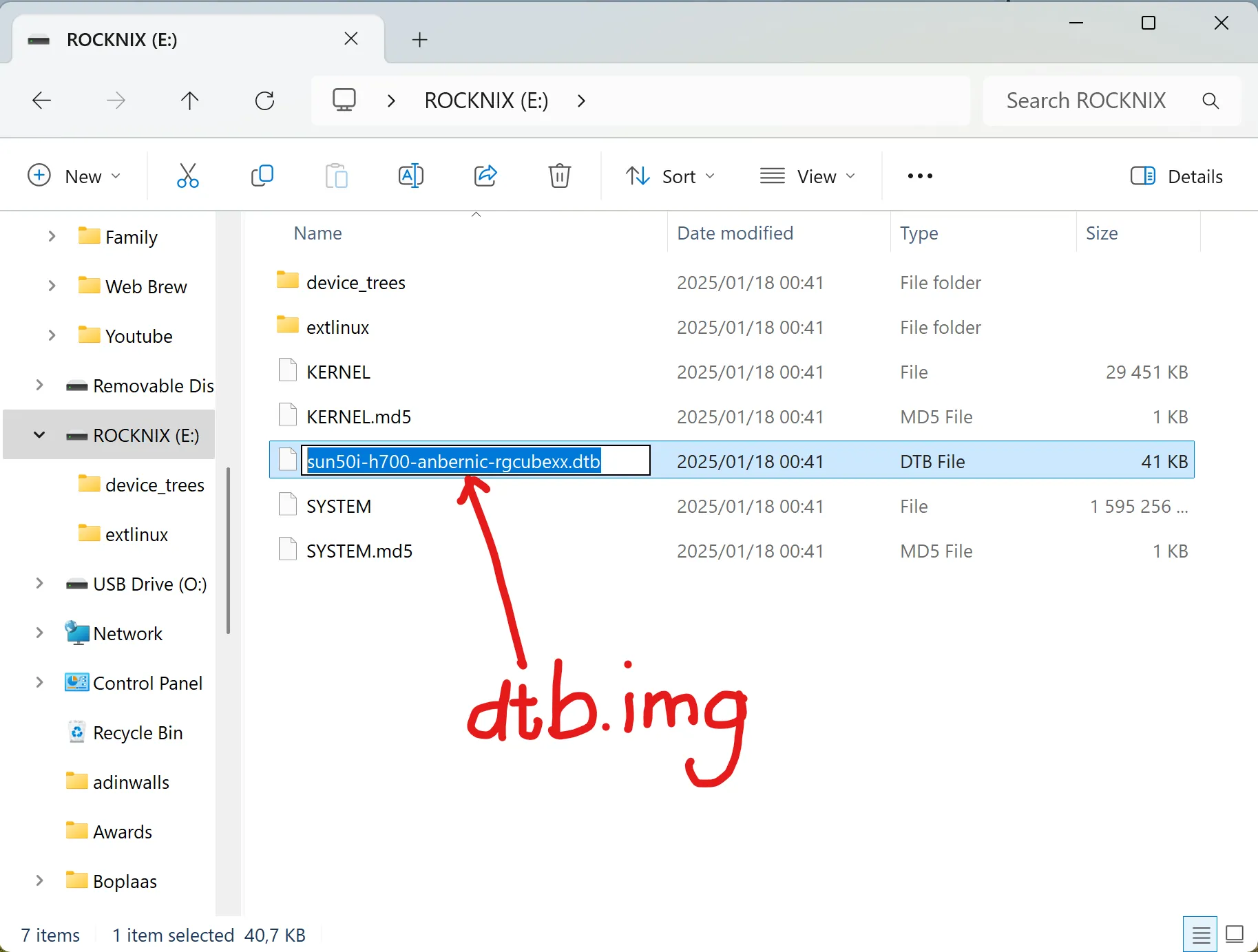
- Say Yes to the prompt
Plug SD into device
- Now EJECT the ROCKNIX sd card DO NOT JUST REMOVE IT, YOU MUST EJECT IT
- Make sure your Cube XX (or H700/XX handheld) is turned off and insert the SD card into TF1/INT
- Press the power button for about 2 seconds and it should power up with a ROCKNIX logo
- Setup could take a few minutes
- Once setup is initialised, press start and power off your device
- Now place that second SD card (formatted to Ext4, FAT32, or exFAT) into TF2 and power on the device again.
- Now power it off again
- Place the second SD card back into your computer
- A partition should pop up with a single roms folder - in there you can add your games and your bios files
Adding ROMS
- Here’s a list of bios files you’ll need to find on the Googles:
| System | Bios filename |
|---|---|
| Gameboy | gb_bios.bin |
| Gameboy Advance | gba_bios.bin |
| Famicom/NES | disksys.rom |
| MegaDrive (Genesis) | bios_CD_E.bin bios_CD_J.bin bios_CD_U.bin |
| Playstation | scph1001.bin (a few options here) |
| TurboGrafx | syscard1.pce syscard2.pce syscard3.pce |
| NeoGeo | neogeo.zip (to be placed in roms folder / neogeo folder) |
- There is a bios folder within the roms folder for you to put these
- It is illegal to use Roms that aren’t your own, also… roms for the older systems are easily Googled…
- Drag your roms into the corresponding folders, there are alot but here are a few with their system names to guide you
| Folder | Game System |
|---|---|
| gb | GameBoy |
| gba | GameBoy Advance |
| gbc | GameBoy Color |
| nds | Nintendo DS |
| nes | Nintendo Entertainment System |
| ngp | NeoGeo Pocket |
| psx | PlayStation One |
| sfc | super famicom |
| snes | Super Nintendo |
Installing native Pico8
If you haven’t experience this, Pico8 is a fantastic retro style gaming environment packed with indie games. It uses a square aspect ratio so it is perfect for the Cube.
- Buy and download the Rasberry Pi version of Pico 8: https://www.lexaloffle.com/
- Unzip the file
- Drag all the files over except the .txt files and the one .png file to your Pico 8 folder inside the roms folder on your SD card
- Thats it!
- Now insert your card, power on your device, navigate to Pico 8 and open Splore
- Enjoy it!
Setting up ROCKNIX
- Open the system menu by pressing START
- NETWORK SETTINGS > ENABLE WIFI
- WIFI SSID > SELECT YOUR WIFI
- WIFI KEY > ENTER YOUR PASSWORD
- USB GADGET FUNCTION > FILE_TRANSFER (This will allow you to connect to your computer via USB cable and add or remove roms)
- GAME SETTINGS > RETROACHIEVEMENT SETTINGS > ENABLE
- ENTER USERNAME AND PASSWORD (Get this from RetroAchievements.org)
- UPDATES & DOWNLOADS > THEMES - downoad some themes
- USER INTERFACE SETTINGS > THEME SET > SELECT A THEME (Alot are stretched to the square screen)
- SCRAPER
- SCRAPE FROM > THEGAMESDB (less accurate but you dont need an account) or SCREENSCRAPER (create an account at https://screenscraper.fr/
- SCRAPE NOW - to scrape everything
- The great thing about Rocknix is that filters and shaders (things to make your games look like the olden days) can be done from the system menu:
- GAME SETTINGS > PER SYSTEM ADVANCED CONFIGURATION > PICK A SYSTEM > SHADER SET / VIDEO FILTER
- I am not going into specific shaders and filters for this video but just to say filters use less CPU than shaders, so for a low end device like this, sometimes filters are the way to go.
- You will need to set a filter/shader, open a game, see if you like it, and repeat that process until you find something you like
Rocknix Shortcut Keys (Hotkeys)
Rocknix doesn’t utilise the M button as a menu button as they do in the stock firmware, so you’ll need to get used to the Hotkeys:
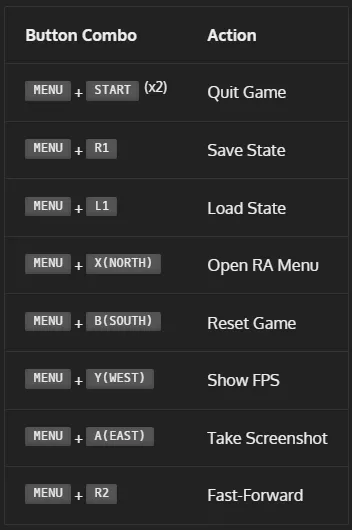
PSP menu - L3
Please let me know on Discord if there is anything you’d like added here: